
Enhance Your Marketing Insights with
UTM Event Tracker and Analytics Plugin
This plugin allows you to effortlessly track events and analyze data using UTM parameters. Whether you’re monitoring click-through rates, measuring campaign effectiveness, or analyzing user engagement, this plugin has you covered.
Getting Started
Once the plugin is installed and activated, you can start tracking events and analyzing data using UTM parameters. Here’s how to get started:
Define Your UTM Parameters
Determine the UTM parameters you want to track. Common parameters include source, medium, campaign, term, and content.
Insert UTM Parameters
Insert the UTM parameters into your links wherever you want to track events. This could be in emails, social media posts, advertisements, etc.
Analyze Data
Visit the plugin dashboard to analyze the data collected through UTM tracking. Gain insights into user behavior, campaign performance, and more.
🚀 Unlock Powerful Insights with Pro
Take your tracking to the next level with advanced features designed for serious marketers and store owners. The Pro version gives you full control over your UTM campaigns, user behavior, and event tracking—helping you make smarter decisions with richer data.
👇 Here’s what you get when you upgrade to Pro:

📊 View Top 5 UTM Keywords in Analytics
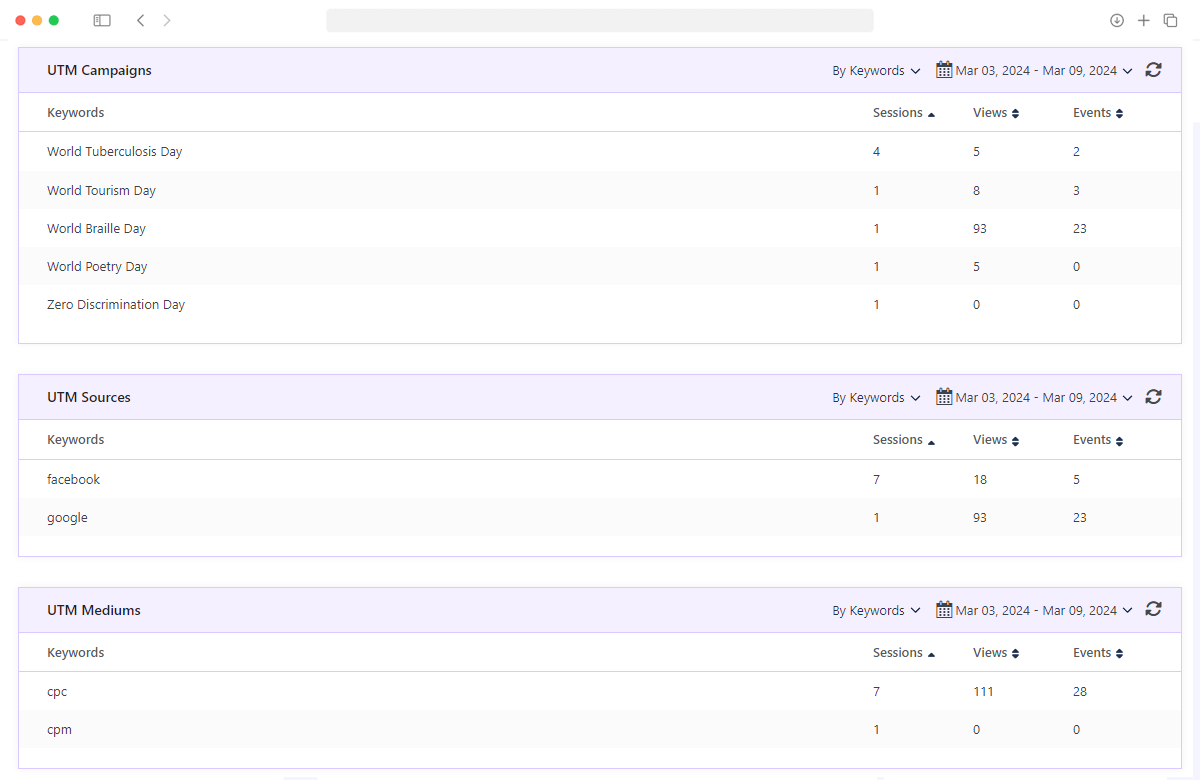
Get a comprehensive view of your marketing performance with Pro-level insights. Unlike the free version—which only shows the top 2 results—the Pro version reveals the Top 5 UTM Keywords across all key metrics:
- 🔍 See Top 5 UTM keywords by Sessions, Page Views, and Events
- 📈 Understand which marketing efforts drive the most engagement
- 🎯 Make informed decisions with richer, more actionable data
- 📊 Dedicated analytics screens for each UTM parameter (keyword)
- 🚫 Free version limited to only top 2 entries per parameter
Perfect for marketers and store owners who want full visibility into their UTM tracking performance—because every click tells a story.

⚙️ Track Unlimited Events Per Session
Unlock the full story behind every visitor’s journey. In the free version, you’re limited to viewing only the first 2 events per session—but with the Pro version, there are no limits:
- 🎯 Track all visitor actions, from form submissions to purchases
- 🛒 Monitor key WooCommerce and EDD events like Add to Cart and Place Order
- 🔗 Capture custom events such as phone link clicks, email clicks, and more
- 📋 Understand complete user behavior with detailed event logs
- 🚫 Free version restricts visibility to just 2 events per session
Perfect for store owners, marketers, and site admins who need deeper insight into what users are doing—every click, every action, every time.

🔧 Add Unlimited Custom Events
Go beyond the basics and track exactly what matters to your business. While the free version allows just 2 custom events, the Pro version removes the cap—giving you full control over event tracking:
- 📌 Create unlimited custom events tailored to your specific needs
- 📞 Track phone number clicks to measure direct contact interest
- ✉️ Monitor email link clicks to see who’s reaching out
- 🛍️ Capture purchase button clicks for conversion analysis
- 🧾 Track form submissions and multistep form progress
- 🔗 Record external and internal link clicks to evaluate navigation behavior
- 🎯 Set up CTA button interactions to optimize funnel performance
- 🚫 Free version limited to only 2 custom events
Perfect for marketers, store owners, and developers who want full visibility into how users interact with their site—from subtle touches to major conversions.

📤 Send Unlimited Google Analytics Events
Maximize your insights by sending all the important user actions to Google Analytics. In the free version, you’re limited to just 1 event, but the Pro version removes that cap entirely:
- 🚀 Send unlimited events to Google Analytics for deeper tracking
- 📝 Track form submissions
- 🔧 Include custom events like button clicks, link taps, video plays, etc.
- 📊 Build more complete user journeys inside your GA reports
- 🚫 Free version allows only 1 event to be sent to Google Analytics
Perfect for businesses that rely on accurate GA data to fine-tune their marketing, UX, and conversion strategy.

🎯 Track Events Without UTM Parameters (Session)
Don’t let valuable data slip through the cracks. In the free version, events are only tracked if a visitor arrives with UTM parameters in the URL. The Pro version removes this limitation, giving you complete freedom:
- ✅ Track custom events even if no UTM parameters are present
- 📈 Send Google Analytics events for any interaction—no UTM needed
- 🔍 Capture user actions from direct traffic, organic search, or bookmarked links
- 🛠️ Useful for tracking behavior across the entire site, not just campaign visitors
- 💼 Ideal for long-term users, returning customers, and non-UTM visits
- 🚫 Free version requires UTM parameters in the URL for tracking
With the Pro version, every visitor counts—whether they come from a campaign link or not.
$59
/once
UTM Event Tracker and Analytics Pro
Empower marketers with the tools they need to track, analyze, and optimize their marketing campaigns effectively.
- Complete UTM Parameter Tracking
- Real-Time Event Monitoring
- In-Depth Analytics Dashboard
- Conversion Attribution Made Easy
- 7-Day Money-Back Guarantee*
- Dedicated Support
- Lifetime Updates
*Before proceeding, please read our Refund Policy.